
For parking options, we recommend using Parkopedia.
We look forward to welcoming you to our flat and hope you have a pleasant stay. Below you will find all the relevant information and instructions for your holiday. If you have any questions, please do not hesitate to contact us.
Check-In: from 3 pm
Check-Out: until 10 am
All information about check-in and key handover can be found in this document.
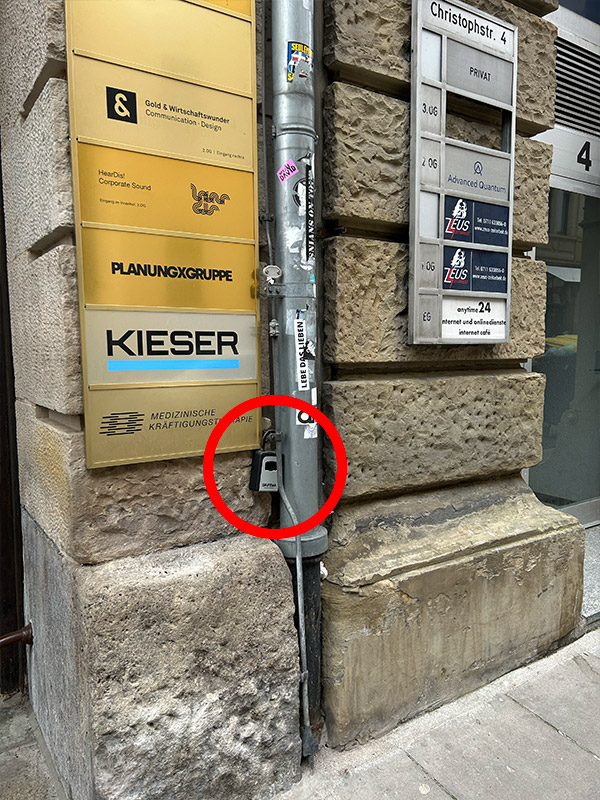
You’ll find a key box in the courtyard (see photo). Turn the numbers to the correct combination and press the black switch on the left side down to open the box and retrieve the key.
Please return the key to the box when you check out.
This key opens the front door.
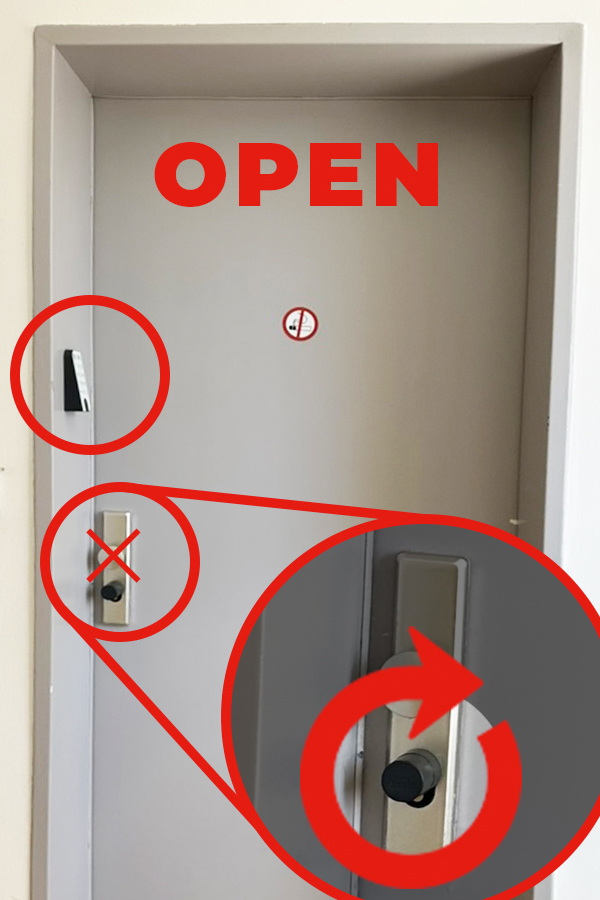
The apartment is located on the first floor. A numerical code is required to open and close the flat. To do this, press the power-button (top left) with the pow switch shown and enter the code next to the BLUE DOOR. The circular arrow should now light up red.
The black lock below the door knob can then be turned to the right to open the door or to the left to close the door.
Enter the number combination (including the power button):
544717
Important: The black, round lock must be turned to the RIGHT to open the door. The silver-coloured knob cannot be turned.
WLAN-Name: gigacube-BD319D
Passwort: 5mQ3ny3m2nr42355
Please contact +49 176 189 808 03 to fix any issues. Our janitor is available from 08 am - 06 pm.
Please contact +49 176 189 808 04 for any issues around cleaning. Our staff is available from 08 am - 06 pm.
In case of emergency, please contact +49 176 189 808 04 at any time.
For any medical or life-threatening emergency, please call 110 or 112 at any time.